
Your WordPress website can look perfectly healthy while a vulnerable plugin, hidden code injection or suspicious administrator account quietly creates a serious business risk.
Modern WordPress threats are not always visible, and installing another plugin does not automatically solve the problem. Tools can generate alerts without explaining which issue matters most or how to fix it safely. That is exactly why AI WordPress security is becoming essential for businesses that rely on WordPress for leads, sales and customer trust.
AI can analyse website data, identify unusual behaviour, review custom code and accelerate incident response. Its real value comes from combining detection with experienced developers who can verify the risk, implement the correct fix and test the website afterwards.
Here are 11 ways businesses can use AI WordPress security to build stronger protection without relying on automation alone.
1. Begin With an AI-Assisted WordPress Security Audit
A professional AI WordPress security audit should be the starting point, not an emergency measure used only after a website has been hacked.
AI can help assess the WordPress installation, hosting environment, plugin inventory, user accounts, activity logs and scan results. It can group findings and highlight patterns that require closer investigation, allowing specialists to focus on genuine risks.
What an AI WordPress Security Audit Should Cover
- WordPress core, plugins and themes
- Administrator accounts and permissions
- Suspicious files, scripts and database entries
- Forms, APIs and third-party integrations
- Hosting and server configuration
- Backups and restoration readiness
The report should prioritise issues by severity and business impact. Automated warnings without a remediation plan provide limited protection.
2. Identify and Prioritise Plugin and Theme Vulnerabilities
Plugins make WordPress flexible, but each component expands the website’s attack surface. Even popular plugins can disclose vulnerabilities or become attractive targets because attackers know they are installed across many websites.
Wordfence reported that 2,213 vulnerabilities were added to its intelligence database during the fourth quarter of 2025. Most were plugin-related, while 905 remained unpatched at the end of the quarter. Popularity and positive reviews therefore, cannot guarantee security.
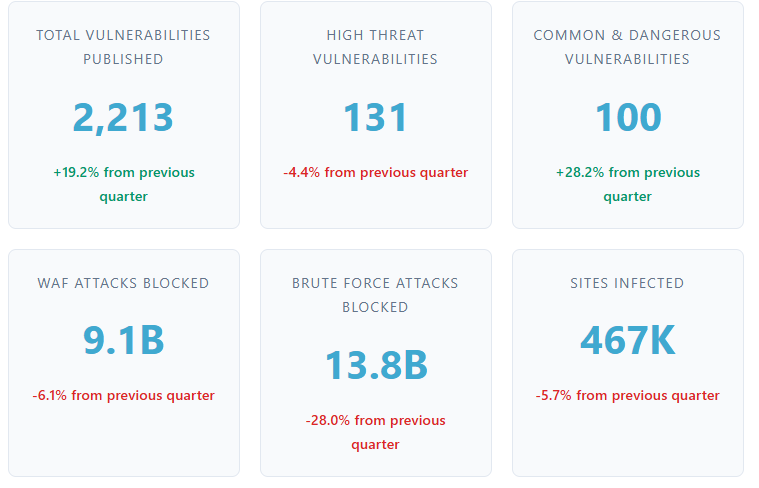
Source: Wordfence Q4 2025 Threat Intelligence Report.
AI can connect vulnerability severity, exploitability, patch availability and business importance. An agency can then test updates in staging, remove abandoned software or replace risky components without disrupting important website functions.
3. Detect Malware, Backdoors and Suspicious Code
AI-enhanced scanning can help identify unusual patterns in files and code, including threats that may not match a basic known-malware signature.
AI WordPress Plugins & Tools Worth Considering
- Wordfence for firewall protection, malware scanning and file integrity checks
- MalCare for cloud-based scanning, malware removal and firewall capabilities
- Sucuri for activity auditing, remote malware scanning, hardening and firewall options
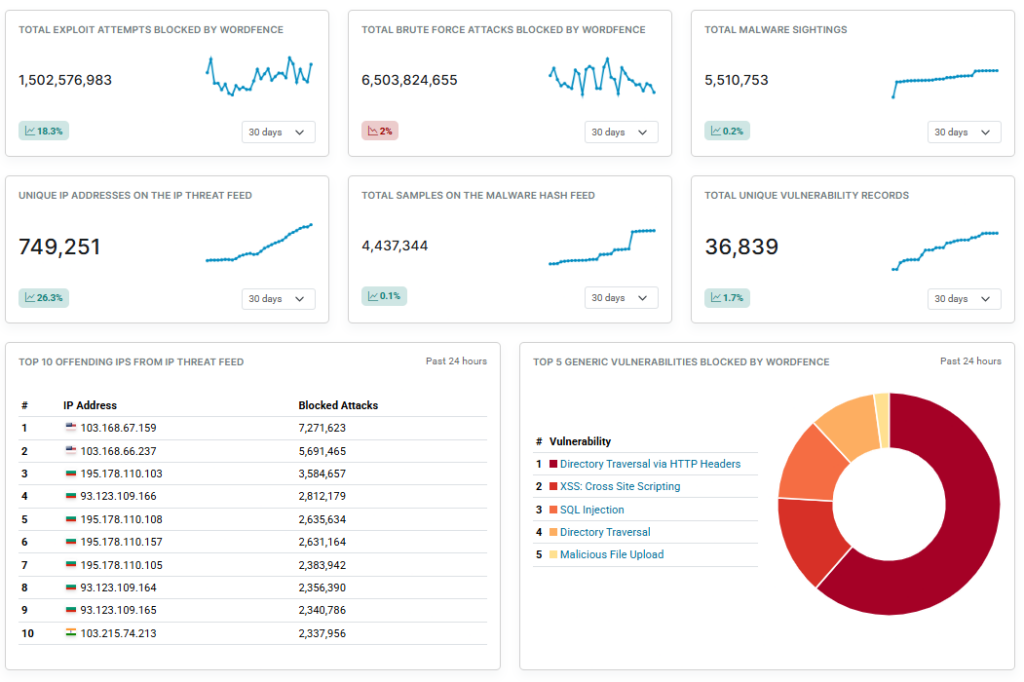
Image: WordFence Intelligence
The right tool depends on the website’s hosting, traffic and functionality. Installing several overlapping plugins may create conflicting rules, performance issues and duplicate alerts.
A professional investigation may also examine database content, scheduled tasks, must-use plugins and server files. A clean plugin scan alone does not prove that the entire environment is safe.
4. Monitor Unusual Website Behaviour
A compromised website may behave differently before obvious damage appears. AI can compare current activity with normal patterns and surface events such as unusual administrator logins, unexpected plugin installations, page changes, repeated failed logins, new redirects or abnormal checkout behaviour.
AI can rank unusual activity, so serious events receive attention first. Monitoring must also connect to a response process covering alert review, access restriction and website restoration.
Without ownership and action, even an accurate alert has little value. A business needs a clear process for determining whether an event is harmless, accidental or evidence of a genuine compromise.
5. Block Malicious Bots and Automated Attacks
WordPress websites are continuously visited by bots. Some are legitimate search crawlers. Others attempt credential stuffing, form spam, scraping, brute-force logins and automated vulnerability scans.
AI-assisted firewalls can analyse request frequency, source reputation, page targets and repeated access patterns to distinguish normal visitors from suspicious automation.
Relaxed rules may miss attacks, while aggressive settings can block customers, payment services or search engines. This is particularly important for WooCommerce stores and platforms with custom APIs.
A professional team can test firewall rules around real website traffic rather than depending entirely on generic defaults.
6. Use Claude to Support Custom WordPress Code Reviews
AI coding tools can assist with reviewing custom themes, plugins, PHP functions, JavaScript and integrations. Claude can help trace how data moves through code, identify insecure logic and flag areas requiring deeper inspection.
Anthropic has introduced Claude Code Security in a limited research preview. It scans codebases for vulnerabilities and suggests targeted patches for human review. Anthropic also states that developers retain control, and changes are not applied without approval.
Where Claude Can Assist
Claude may help identify:
- Missing user permission checks
- Unsafe database queries
- Weak input validation
- Exposed secrets or API keys
- Insecure file uploads
- Risky AJAX or REST API endpoints
Claude should support an experienced developer, not replace one. AI findings must be validated and tested in a staging environment before being applied to a live website.
Businesses requiring custom monitoring, workflow automation or intelligent website integrations can combine WordPress expertise with Webential’s AI solutions.
7. Assess Plugin Risk Before and After Installation
A plugin should be treated as a software dependency, not assumed to be safe because it appears in a directory or has thousands of installations.
AI can organise update history, compatibility information, known vulnerabilities, permissions and support activity. This helps technical teams decide whether a plugin should be installed, retained, replaced or removed.
A professional review should consider whether the plugin:
- Is actively maintained
- Requests unnecessary access
- Duplicates existing functionality
- Has recurring security or compatibility issues
- Is essential to an important business process
- Can be replaced with a more reliable option
The review must continue after installation because previously suitable software may become abandoned, unnecessary or incompatible.
8. Detect Suspicious Logins and Privilege Changes
Many attacks begin with a stolen password, reused credentials, or an administrator account that should no longer exist.
AI-assisted monitoring can identify unusual geographic access, repeated failed logins, sudden password resets, newly created administrators and unexpected user-role changes.
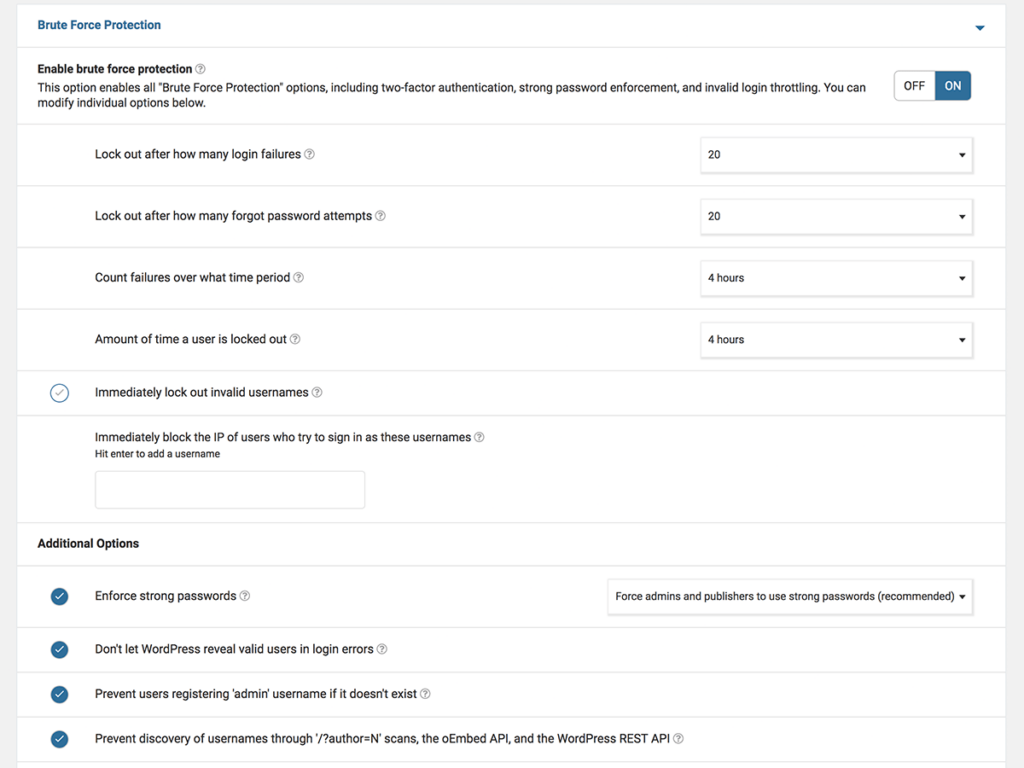
Specialists can combine these insights with:
- Multi-factor authentication
- Least-privilege user roles
- Restricted administrator access
- Removal of inactive accounts
- Login rate limiting
- Regular access reviews
The objective is to reduce unnecessary access and make abnormal behaviour easier to identify, especially when agencies, contractors and employees all use the website.
9. Monitor File and Database Integrity
Attackers may modify theme files, inject code into the database, alter scheduled tasks or hide backdoors in directories that are rarely checked.
File integrity monitoring compares the website against a known clean state. AI can help distinguish expected changes from suspicious ones by considering timing, location, code patterns and the account responsible.
Legitimate updates, caching and content edits also create changes. Without prioritisation and human review, a genuine compromise may be buried among harmless events.
When a suspicious change is confirmed, the response must do more than delete the affected file. The technical team must identify the original entry point, examine related changes and determine whether another access method was created.
10. Detect SEO Spam, Redirects and Reputation Damage
A hacked website does not always go offline. Attackers may keep it operational while injecting spam pages, hidden links, malicious redirects or altered metadata.
These attacks can damage rankings, trust and brand visibility, including how a business appears in AI-generated search results.
AI-assisted monitoring can detect changes such as:
- Sudden increases in indexed pages
- Unfamiliar search queries and keywords
- Suspicious outbound links
- Unexpected organic traffic changes
- Modified page titles and metadata
- Redirects that appear only for certain users or devices
The technical cleanup should then be coordinated with search visibility recovery. Removing malicious code may not automatically remove spam URLs from search results or repair lost visibility.
Webential’s AI SEO services can support visibility across traditional and AI-driven search while the development team resolves the underlying WordPress issue.
11. Combine AI WordPress Security with Managed Services
AI delivers the most value within an ongoing maintenance process. Security is not a one-time installation, and no plugin can guarantee that a website will never be compromised.
WordPress advises keeping core software, plugins and themes updated. Its official guidance describes security as continuous work involving planning, monitoring, maintenance and recovery.
What Ongoing Management Should Include
- Tested core, plugin and theme updates
- Vulnerability and malware monitoring
- Firewall and login protection
- Staging checks before major changes
- Reliable off-site backups
- Incident investigation and recovery
- Post-incident hardening
- Clear security reporting and recommendations
AI may identify an issue quickly, but a specialist must determine whether it is genuine, fix the root cause and verify that customer-facing functions continue to work.
Are AI WordPress Security Plugins Enough to Protect WordPress?
No single security plugin, scanner or AI model provides complete protection.
Wordfence, MalCare and Sucuri can contribute useful capabilities, but the correct setup depends on the website. A brochure site, WooCommerce store, membership platform and custom application have different requirements.
A complete WordPress security approach combines:
- Suitable security technology
- Secure hosting and server configuration
- Controlled user access
- Regular software maintenance
- Tested website backups
- Expert incident investigation and response
AI improves analysis, while human expertise ensures it leads to the right decision.
Protect Your WordPress Website With Webential
A vulnerable WordPress website can disrupt lead generation, expose customer information, interrupt online sales and damage search visibility.
Webential provides WordPress maintenance services for organisations requiring proactive updates, monitoring, technical support and ongoing website care.
We serve clients globally, with local points of contact in Sydney, Australia, and Tampa, USA. Businesses in Florida can also access our dedicated WordPress maintenance services in Tampa.
Our approach combines experienced developers, carefully selected security tools and AI-assisted analysis. The objective is not to install more software. It is to create a monitored, maintainable and recovery-ready WordPress environment that protects the business behind the website.
Get a Free WordPress Security Quote
Unsure whether your WordPress website is properly protected or whether existing security tools are doing enough?
Webential can review your website, identify potential vulnerabilities and recommend an appropriate combination of maintenance, monitoring and AI-assisted security measures. We support businesses across Australia, the USA and worldwide, with local points of contact in Sydney and Tampa.
Get a free quote to discuss your WordPress security and maintenance requirements with our team.
Frequently Asked Questions
1. Can AI Secure a WordPress Website?
AI WordPress security can help detect suspicious activity, malware and vulnerabilities. However, it works best alongside professional monitoring, secure hosting, updates and backups.
2. How Does AI Detect Malware in WordPress?
AI scans files, plugins, themes and code for unusual patterns. It can help identify hidden malware, backdoors and unexpected website changes.
3. Can AI Perform a Complete WordPress Security Audit?
AI can support an audit by analysing vulnerabilities, activity logs and code. A WordPress specialist is still needed to verify findings and apply safe fixes.
4. Is a WordPress Security Plugin Enough?
No. A plugin is only one layer of protection. Strong security also requires updates, backups, access controls, hosting checks and ongoing monitoring. AI WordPress security can improve detection and monitoring, but it should still be supported by expert maintenance and regular security reviews.
5. How Often Should an AI WordPress Security Audit Be Completed?
Most business websites should have a full AI WordPress security audit at least once a year, with continuous monitoring between audits. High-risk or eCommerce websites may need more frequent reviews.